A real board
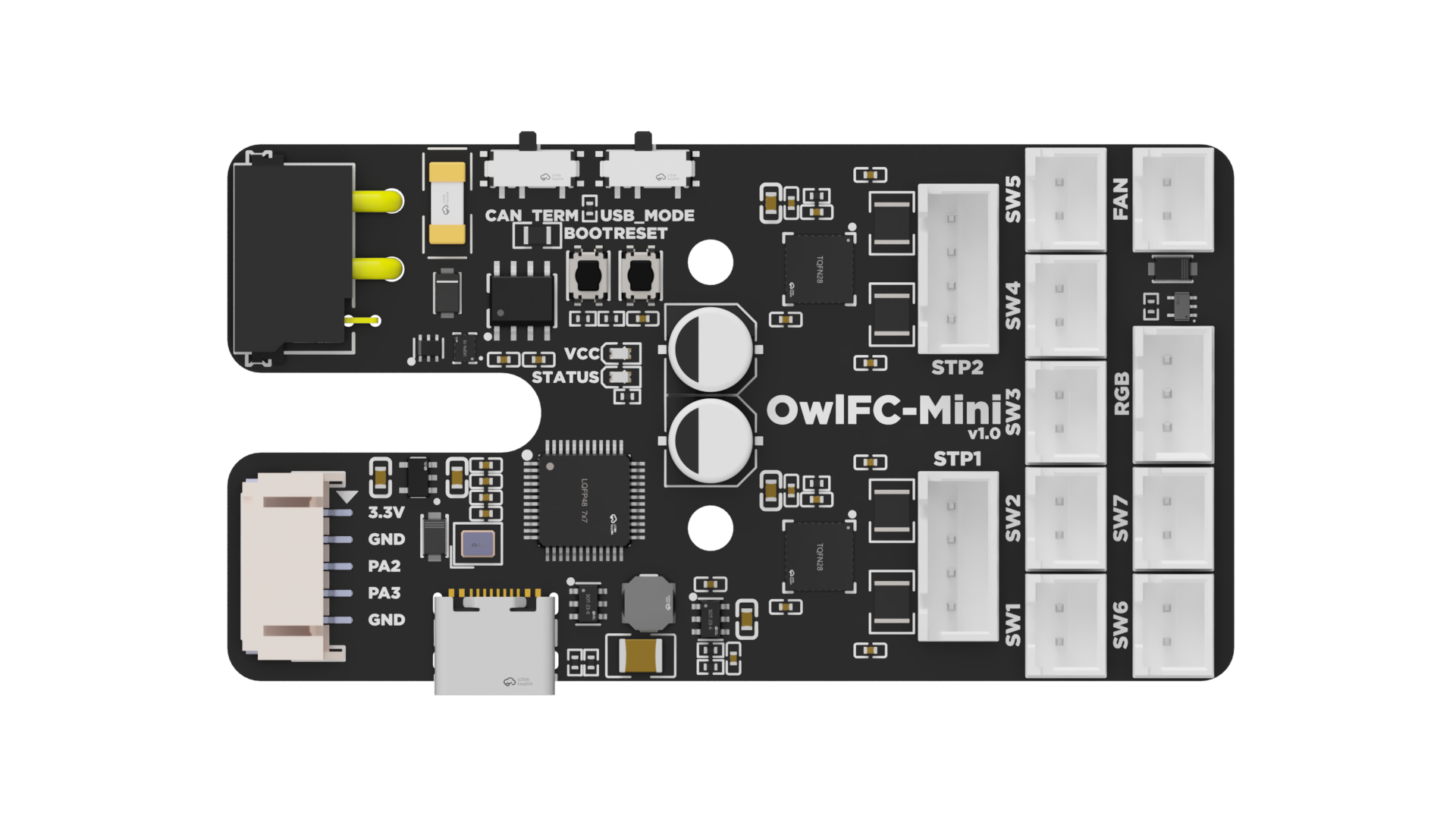
The OwlFC-Mini, a filament changer controller, with 18 connectors. Hover a connector on the board for its pinout, or open the connector list with the ☰ button to browse them all:
Things to try:
- Narrow the window. Below 1080 pixels the connector list moves under the board, and the frame grows to fit it, with no scrollbar inside. That is the auto-height protocol at work.
- Flip the site's light/dark toggle. The pinout follows it; see Light and dark mode.
- Press the fullscreen button beside the list toggle.
The pinout uses isikstech, a theme kept beside the board folders rather than bundled with PinConnect. It has a transparent background, amber highlights, Roboto, and tooltip_placement = "panel", which shows the selected connector in a panel under the board instead of a floating tooltip.
The sources
Download owlfc-mini.toml and owlfc-mini.png to open the board in the designer. The designer cannot read the board's own theme, so it renders the board with the default theme and says so.
The theme, isikstech.toml
# Isik's Tech docs site PinConnect theme

[theme]
name = "isikstech"

[font]
family = "Roboto"
source = "google"
weights = "400;500;600"

[font.label]
family = "Roboto Mono"
source = "google"
weights = "400;500"

[behavior]
sidebar_default_open = true
sidebar_max_width = 360
sidebar_responsive_stack = true
sidebar_stack_breakpoint = 1080
font_scale               = 1.1
symbol_size              = 22
hint_placement           = "below"
tooltip_placement        = "panel"

[colors.light]
hs-hover    = "rgba(255,191,0,.13)"
hs-stroke   = "rgba(255,191,0,.75)"
hs-active   = "rgba(255,191,0,.4)"
bg = "transparent"
jumper      = "rgba(255,191,0,.4)"
jumper-stroke = "#ffbf00"

[colors.dark]
hs-hover    = "rgba(255,191,0,.13)"
hs-stroke   = "rgba(255,191,0,.75)"
hs-active   = "rgba(255,191,0,.4)"
bg = "transparent"
jumper      = "rgba(255,191,0,.4)"
jumper-stroke = "#ffbf00"
The first connector of owlfc-mini.toml
[board]
title = "OwlFC-Mini Pinout"
image = "owlfc-mini.png"
width = 1920
height = 1080
theme = "isikstech"
theme_dir = ".."

[[connector]]
id = "STP1"
name = "Stepper 1"
type = "XH-F"
x1 = 1211
y1 = 622
x2 = 1317
y2 = 846
orientation = 90
description = "Lane 1 stepper motor connector"
label_style = "flat"
symbol = "motor"

  [[connector.pin]]
  name = "B"
  color = "#E74C3C"

  [[connector.pin]]
  name = "B"
  color = "#2ECC71"

  [[connector.pin]]
  name = "A"
  color = "#FFBF00"

  [[connector.pin]]
  name = "A"
  color = "#3498DB"